

TL;DR
This guide shows you how to search Google Scholar, get free access to papers, judge whether a source is trustworthy, and cite it correctly. You will learn how to build better searches, use filters and citation trails, find legal copies of paywalled papers, check the quality of sources, create citations, and save papers for later. You will also learn when Google Scholar is not enough and which subject-specific databases you can use instead. Finding good sources is the first real step of any research paper, because your argument can only be as strong as the evidence behind it.
Want a PhD mentor to guide your research from sources to finished paper? Apply to Horizon’s research program.
What is Google Scholar (and how is it different from Google)?
Google Scholar is a free search engine that helps you find scholarly literature. Instead of primarily returning news articles, websites, videos, and commercial pages, it searches academic material such as journal articles, conference papers, theses, dissertations, books, and, in some cases, court opinions.
That makes it particularly useful when you are working on a research paper or literature review. A normal Google search might help you understand a topic, while Google Scholar helps you find the research that has already been done on it.
Google Scholar also gives you tools that are especially useful for research. Under a result, you may see links such as “Cited by,” “Related articles,” “All versions,” and “Cite.” These let you follow the research surrounding a paper, locate other versions of it, and generate a starting point for your bibliography.
But there is an important limitation: Google Scholar is a search engine, not a quality-control system. A paper appearing in Google Scholar does not automatically mean that it is peer-reviewed or reliable. You still need to evaluate who wrote it, where it was published, what methods it used, and whether its evidence supports its conclusions.
How to search Google Scholar effectively
The biggest change you can make to your searches is simple: search for the concepts researchers use, rather than typing a complete question the way you would into Google.
For example, instead of searching:
how does sleep affect teenagers’ grades
try:
sleep deprivation adolescents academic performance
The second search uses terms that are more likely to appear in academic titles, abstracts, and keywords.
Start with keywords, not questions.
Begin with two to four important concepts from your research question. Then try synonyms. No research question yet? Browse these research topics for high school students first, then come back and search.
For a project about social media and adolescent sleep, you might try:
- social media adolescents sleep
- social media use adolescent sleep quality
- screen time teenagers sleep
- “social media use” sleep adolescents
Keep a running list of searches that produce useful papers. The words you discover in good papers often become the keywords for your next search.
Use search operators carefully.
Google Scholar supports several useful search techniques. Some are documented by Google, while others are commonly supported in Scholar but are less formally documented, so treat them as practical search tools rather than permanent guarantees.
| Operator | What it does | Example |
| “…” | Searches for an exact phrase | “academic performance” |
| OR | Searches for either term | adolescent OR teenager sleep |
| – | Excludes a word from results | jaguar -car |
| author: | Searches for work associated with a particular author | author: “Jane Goodall” |
| intitle: | Searches for a term in the title | intitle: “sleep deprivation” |
| allintitle: | Searches for multiple terms in titles | allintitle: sleep adolescents academic performance |
Google Scholar’s search documentation explicitly supports author searching and phrase searches, while current research guides also document the title-search forms above. For precise title, author, publication, or date restrictions, use Google Scholar’s Advanced Search interface.
For example, quotation marks can be particularly useful when a phrase has a specific meaning. Compare:
climate anxiety adolescents
with:
“climate anxiety” adolescents
The second search tells Scholar to keep “climate anxiety” together as a phrase.
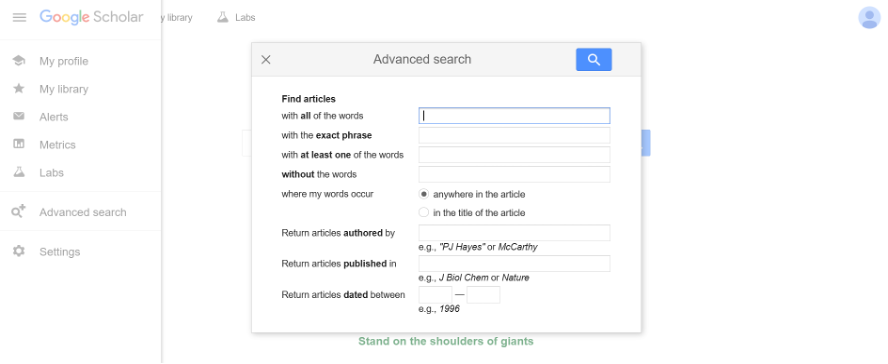
Use Advanced Search
If you do not want to remember search syntax, use Advanced Search.
- Open Google Scholar.
- Open the menu in the upper-left corner.
- Select Advanced search.
- Use the available fields to search for an exact phrase, particular words, an author, a publication, or a date range.
- Run the search and adjust the terms if the results are too broad or too narrow.
Google Scholar’s Advanced Search is particularly useful because it lets you specify fields such as author, title, and publication, and restrict results by date.
Use date and result filters
For a fast-moving topic, try limiting your search to recent papers, such as results published since 2022. You can also switch between sorting by relevance and sorting by date when those options are available in the results interface.
Do not automatically assume newer is better. A foundational paper from 2005 can be more useful than a poorly designed paper from 2026, depending on your research question.
Review articles are also extremely useful when you are starting. A review brings together findings from many studies instead of presenting just one experiment or dataset. Reading a good review can help you learn the vocabulary of a field and identify the papers that researchers repeatedly discuss.
Follow the research trail.
Once you find one genuinely useful paper, stop searching from scratch and follow its connections.
Click Cited by to find newer papers that have cited that work. Click Related articles to find other research that Google Scholar considers closely connected. This is one of the most useful techniques for building a literature review because one strong paper can lead you to dozens of relevant sources.
You can also inspect the paper’s reference list. Older sources in the references can help you find foundational research, while the “Cited by” results can lead you toward newer developments.
A good workflow is:
Start broad → find one strong paper → inspect its references → check “Cited by” → open related papers → repeat.
If your searches are returning hundreds of irrelevant results, narrow the concepts. If they return almost nothing, remove one term or try a synonym.
How to get free access to research papers
A Google Scholar result does not guarantee that you can read the entire paper for free. Some articles are available openly, while others require a subscription or payment. You should never assume that a paywall means the paper is unavailable to you.
Try these legal options in order.
1. Click the PDF or HTML link
Look to the right of a search result for a link labeled [PDF], [HTML], or a similar full-text option. This may take you directly to a free copy hosted by a university, research organization, journal, or author.
2. Click “All versions”
If the first result is paywalled, click All versions underneath it. Google Scholar may show another version hosted somewhere else, such as a university repository or an author’s academic webpage.
The version may look different from the publisher’s copy, but it can still contain the research you need.
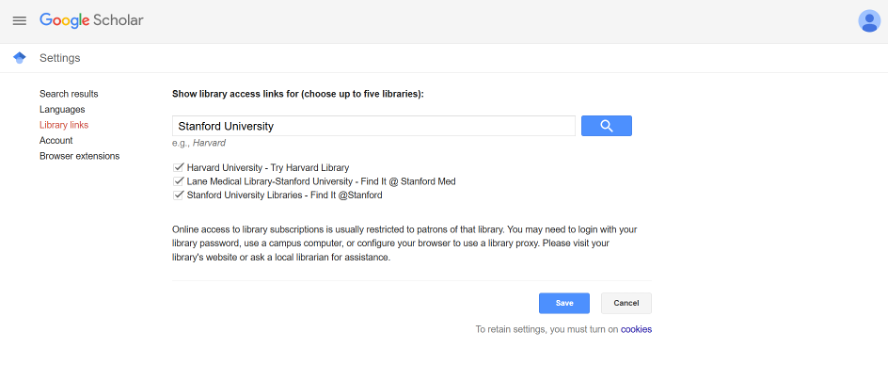
3. Set up Library Links
If your school, public library, or university provides access to academic databases, connect it to Google Scholar.
- Open Google Scholar.
- Open the menu and select Settings.
- Select Library links.
- Search for your library or institution.
- Tick the relevant library option.
- Select Save.
You may then see a library link alongside papers available through that institution’s subscriptions.
4. Use Unpaywall
Unpaywall is a free browser extension that looks for legally available open-access copies of research papers. It draws from sources such as university and government repositories and publisher-hosted open content.
5. Check your school or public library
Your school or public library may subscribe to databases that you can use for free. Ask a librarian whether they offer remote database access or interlibrary loan. Interlibrary loan lets a library request material from another library when it doesn’t hold the item.
6. Email the author
Researchers often have a legitimate copy of their own paper and can share it with other researchers or students.
The same short, polite email works when you’re asking a professor about a lab spot. Here’s how to find a research lab as a high school student.
You can write:
Subject: Request for a copy of your paper
Dear Dr. [Last Name],
I am a high school student researching [topic] for a research project. I came across your paper, “[Paper Title],” and would like to read it because it is relevant to my research.
If you can share a copy, I would be very grateful.
Thank you for your time,
[Your Name]
7. Look for a preprint
In fields where preprints are common, you may find an earlier version of the research on a repository such as arXiv, bioRxiv, or SSRN. Remember that a preprint may not have gone through peer review yet, so check which version you are reading before citing it.
How to tell if a source is trustworthy
Finding a paper is only half the job. Before you use it, evaluate it.
Use this checklist:
- Is it peer-reviewed? Peer review means other researchers in the field evaluated the work before publication. It provides useful evidence of quality control, but it doesn’t guarantee every claim is correct.
- Who wrote it? Look at the authors’ qualifications and institutional affiliations.
- Where was it published? Check the journal or publisher. Is it an established publication in the field?
- How many times has it been cited? A citation is a reference to a paper in another scholarly work. A high citation count can indicate that a paper has influenced later research, but citation counts naturally tend to be lower for newer papers.
- How recent is it? In rapidly changing fields, recent research may matter more. In history or foundational theory, older sources may still be essential.
- Is it a primary study or a review? A primary study reports original research. A review summarizes and analyzes research that already exists.
- Are there red flags about the journal? Predatory journals present themselves as legitimate scholarly journals while using weak or misleading publishing practices, often focusing on collecting fees. Be cautious if a journal makes unrealistic promises about acceptance, hides basic publication information, or has an unclear editorial process.
Do not judge a paper by its title, journal name, or citation count alone. Read the abstract, inspect the methods, and check whether the conclusions actually follow from the evidence.
If you are unsure about a source, ask your teacher, librarian, or research mentor to look at it with you.
How to cite sources from Google Scholar
Google Scholar can generate a citation for you, but treat the result as a starting point rather than a finished bibliography entry.
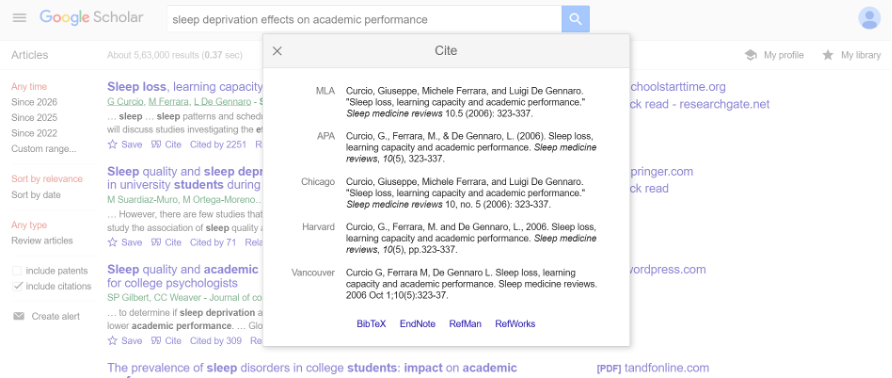
Use the Cite button
- Find the paper you want to cite.
- Click the quotation-mark Cite icon underneath the result.
- Select the citation style you need, such as APA, MLA, or Chicago.
- Copy the generated citation.
- Paste it into your bibliography or reference list.
Always double-check the citation.
Automated citations can contain mistakes. Check the author’s name, article title, journal title, publication year, volume, issue, page numbers, and DOI where applicable. Capitalization rules also vary between citation styles.
For example, a generated citation might incorrectly format a title like this:
Smith, J. (2025). The Effects Of Sleep Deprivation On Academic Performance. Journal of Adolescent Research, 12(2), 45-61.
An APA-formatted version might instead use sentence case:
Smith, J. (2025). The effects of sleep deprivation on academic performance. Journal of Adolescent Research, 12(2), 45-61.
The exact correction depends on the actual publication details, but the principle is the same: never paste an automatically generated citation into your final paper without checking it against the source.
Common citation styles
| Style | Common in | What it looks like |
| APA | Sciences and social sciences | Smith, J. (2025). Article title. Journal Name, 12(2), 45–61. |
| MLA | Humanities and literature | Smith, Jane. “Article Title.” Journal Name, vol. 12, no. 2, 2025, pp. 45–61. |
| Chicago | History and some humanities fields | Smith, Jane. “Article Title.” Journal Name 12, no. 2 (2025): 45–61. |
Your teacher, journal, or research program may specify a particular style. Follow that requirement rather than choosing one based on personal preference.
Export to a reference manager
For a longer research paper, consider using a reference manager such as Zotero. Google Scholar can provide citation data in formats such as BibTeX and RefMan, which can then be imported into compatible reference-management software.
A reference manager stores your sources and can help you insert citations and generate a bibliography in the required style. That can save you hours of manual formatting once your paper contains dozens of sources.
Save time with My Library and alerts
You do not need to download every paper immediately. Google Scholar lets you save useful results to My Library using the star underneath a result. You can then return to those papers later.
Save papers to My Library
- Sign in to your Google account.
- Search for a paper.
- Click the star underneath a useful result.
- Open My Library from the Google Scholar menu to find your saved papers.
You can also organize saved papers using labels, which is useful if you are working on multiple topics.
Create an alert
Alerts are useful if your research project will continue for several weeks or months.
- Run a focused search.
- Select Create alert.
- Enter the email address where you want notifications.
- Confirm the alert.
Google Scholar can then notify you when new results matching your search become available.
Only create alerts for searches that are already producing useful results, or your inbox can quickly become noisy.
When to use other databases besides Google Scholar
Google Scholar is a useful starting point, but it should not necessarily be your only search tool. The database you use can change what research you find because different databases specialise in different fields.
| Database | Best for | Free? |
| PubMed | Medicine, biomedical science and life sciences | Yes, searching is free. Full text varies |
| JSTOR | Humanities, history and many social sciences | Partly. Free content and limited free reading are available, while some material requires access |
| ERIC | Education research | Yes, searching is free, with a full-text filter |
| arXiv | Physics, mathematics, computer science and related fields | Yes |
| SSRN | Social sciences, economics and other fields | Yes, it is currently operating as a free preprint platform |
PubMed is a free database of biomedical and life-sciences literature, although not every record includes free full text. ERIC provides education research and includes a full-text availability on the ERIC filter. JSTOR provides open-access content and free reading options for some material, while other content depends on institutional access. arXiv is an open research-sharing platform, while SSRN announced in 2026 that it is transitioning to focus entirely on its free preprint platform.
A good approach is to use Google Scholar to cast a wide net, then use a database specific to your field to go deeper.
Frequently asked questions
Yes. You can search Google Scholar without paying for the search service. However, some papers you find may be behind publisher paywalls, so the paper itself is not necessarily free.
No. Google Scholar indexes different types of scholarly material, including journal articles, theses, books, and other documents. You need to check the publication and source yourself rather than assuming that every result has been peer-reviewed.
Start with the PDF or HTML links, then try All versions, your school or library, a legal open-access tool such as Unpaywall, the author’s webpage, or a relevant preprint repository. You can also ask the author directly for a copy.
There is no universal number. The right number depends on the length of your paper, your research question, the field, and how much existing research is available. Aim for enough high-quality sources to support your claims and demonstrate that you understand the relevant literature, rather than trying to hit an arbitrary number.
No. Google Scholar is the tool you used to find the research, not the source of the research itself. Cite the actual paper, book, thesis, or other work you used.
Start with a few highly relevant papers, especially recent reviews and papers that repeatedly appear in your citation searches. A research mentor can also help you identify the key papers in a field and decide which ones are worth reading closely. Horizon pairs students 1:1 with PhD scholars who can guide students through exactly this part of the research process.
Go start your literature search.
Pick one topic and run three different Google Scholar searches using different keywords. Save five genuinely relevant papers today, then read their abstracts and follow the “Cited by” and “Related articles” links. If you are new to research, you can also learn more about getting started with research as a beginner and why starting research early in high school can be useful.
You do not need a perfect literature review on your first day. You need a starting point and a system for building from it. As you develop your idea, you can also learn how to choose a research topic and eventually turn your research into a full paper.
Ready to turn those sources into a real paper? Apply to Horizon to work with a PhD mentor, or join an info session to learn how it works.
Resources
More from Horizon:
- Horizon Programs
- 14 Research Programs for Complete Beginners
- Why Starting Research Early Is One of the Best Decisions a High School Student Can Make
- 14 Grants for High School Students Research
- How to Choose a Research Topic as a High School Student
- How to Publish Research in High School
- The Ultimate Guide to Writing a Research Paper in 90 Days
- What Are the Key Components of a High School Research Paper?
Image source: Google Scholar